
Programmable Logic Controllers (PLCs): Complete Beginner-to-Expert Guide
Jun 18, 2025
PLC Basics | Programmable Logic Controller
Introduction
What is a PLC controller and why should you care?
If you are venturing into automation, factories, smart systems, then knowledge of PLC is indispensable.
What Is A Programmable Logic Controller (PLC)?
You may have heard the term. Maybe you've even spotted one in an industrial panel.
But what really is a programmable logic controller?
Let us explain easily.
What Is The Basic Definition Of PLC?
A programmable logic controller is basically an industrial digital computer for the control of machines and processes.
A PLC reads inputs, runs logic, and controls outputs according to how you have programmed it.
In other words, it is a rate machine with a programmable brain. You tell it what to do, and voila-it does it, continuously.
The Role Of A PLC In Automation
Logic is involved in every automatic system-from bottling to traffic lights.
Logic can be wired using relays and timers for that matter (just the old way of doing it).
But the mess grows really big, really fast.
A PLC, however, keeps the mess away.
You write one program instead of having 30 relays.
You reprogram instead of rewiring.
You manufacture precision instead of errors.
This is what the power of a PLC controller looks like.
Quick Overview Of PLC Functions
The PLC works in cycles. It repeats the following four steps:
● Scans inputs - reads sensor data, switch positions, etc.
● Executes logic - runs the code you programmed (e.g., "if X happens, do Y").
● Updates outputs - turns things on/off such as motors or valves.
● Housekeeping tasks - like communication and diagnostics.
It repeats this process hundreds of times each second.
This is how it maintains the real-time smooth running of machines.
Why did PLCs phase out Relays?
Before PLCs came about, automation was via relay logic-arrays of physical switches and contactors.
It worked, but a nightmare had been to maintain and modify.
Then PLCs came:
● Quick troubleshooting
● Less wiring
● Logic reusable, scalable
● Updates become easy through software
A single PLC can replace an entire wall full of relays that way.
Another Real-World Scenario
You press a button.
● The PLC reads that input.
● The PLC proceeds to check your program, which states, "If button ON, then start motor."
● Then it turns on the motor via output.
So that, basically, is the concept of PLC control.
Summary Table: PLC At A Glance
| Feature | Description |
|---|---|
| Function | Automates logic-based machine control |
| Input Types | Sensors, switches, push buttons |
| Output Types | Motors, valves, lights, alarms |
| Programming Language | Ladder Logic, Structured Text, FBD |
| Main Benefit | Replace physical relays with programmable logic |
Main Components Of A PLC System
One will already know what a PLC is; the metal box may hold suitable hardware.
So, let us exercise a little analysis on the main hardware of a PLC, those parts that actually do the ticking.
CPU (Central Processing Unit)
This is the brain of your PLC.
The brain of the PLC handles all logic, data storage, and communications. When you write a program, this is where it runs.
These are some specific functions:
● To read input data from sensors.
● To execute your control logic.
● To send output signals to actuators.
● To manage internal memory and to perform diagnostic checks.
Most of the CPUs will have built-in ports for programming and communication (such as Ethernet or serial ports).
Higher-end CPUs will be able to perform motion control, PID loop calculations, and/or time-base functions.
Power Supply Module
You can't execute any logic without power.
The power supply module puts out low-voltage DC power (commonly 5V or 24V) to the following:
● CPU
● I/O modules
● Any add-on communication modules
Most power supplies will take either 120/240V AC input or 24V DC, depending on the model.
I/O Modules (Input/Output)
This is where the real world connects to your logic.
You usually have two types:
● Input modules- Read signals from devices, such as switches, sensors, and buttons.
● Output modules- Send signals to devices, such as motors, lights, and relays.
Some PLCs have digital I/Os (which are ON/OFF only), and others have analog I/Os (variable signals like 0-10V or 4-20mA).
With modular PLCs, you can mix and match I/O types.
Memory and Storage
Memory is where programs, configurations, and process variables are stored.
Generally, you would have two types:
● RAM-, Volatile memory for temporary logic or variables
● EEPROM and Flash, Non-volatile memory which stores the program permanently
Upon the loss of power supply, the CPU is supposed to still remember its last saved logic.
Programming Device (HMI or PC)
It is a computer system consisting of either laptops, desktops, or HMI panels through which one writes and loads the PLC program.
Most manufacturers have proprietary software; however, the core idea remained:
● Write the logic
● Upload it to the PLC
● Monitor and debug in real time
Some modern-day PLCs support web-based programming as well.
Rack Or Backplane
The rack connects all modular PLC components:
● CPU
● I/O modules
● Power supply
● Communication cards
It is the backbone of data and power distribution throughout the system.
A compact PLC does not have a rack; it combines everything in a single unit.
Summary Table of PLC Components
| Component | Function |
|---|---|
| CPU | Runs the program, handles logic and communication |
| Power Supply | Converts AC to low-voltage DC for internal use |
| Input Module | Reads external signals from buttons or sensors |
| Output Module | Sends control signals to motors, relays, or lights |
| Memory | Stores program code and data |
| Programming Device | Interface for coding and uploading logic |
| Rack/Backplane | Connects all modules in modular PLCs |
Types Of PLCs And Their Differences
Not all PLCs are the same.
Some are tiny. Others control entire factory lines.
So how do you know which type you need?
Here are the main PLC types, how they vary, and where they excel.
Compact-type PLCs (Fixed PLCs)
Compact PLCs have all their components enclosed within a single body.
This includes:
● CPU
● Power supply
● Fixed number of Input/Output points
These kinds of PLCs are meant for small applications-probably gate control, a small pump, or a fan system.
You do not have to add an additional module; it's all built in.
The downside: you cannot expand on it if your project needs to grow.
Use this PLC type when:
● Simplicity is what you want
● You will not need to scale up
● You need a budget-oriented setup
Modular PLCs
Modular PLCs consist of various separate swapping components.
You select the elements including:
● CPU,
● Power supplies,
● I/O modules,
● Communication cards,
● Special function modules (PID, motion, and so on).
They combine on a rack or may be connected to a backplane to physically couple data transfer and power between them.
If more inputs or outputs are needed by your system an I/O module can be easily added.
Use this PLC type when:
● Your process might grow
● Flexibility in the hardware
● Working with large or complex machinery
Small, Medium, and Large PLCs
Another way to classify PLCs is by size:
Small PLCs
Handle under 128 I/O points
Good for home automation or for standalone machines
Medium PLCs
128-1024 I/O points
Used in packaging lines, HVAC systems
Large PLCs
Processes 1024 I/O points
Controls entire factories or process plants
Usually networked and redundant
Soft PLCs
Soft PLCs are software control applications.
Instead of having proprietary PLC hardware gear, a PLC runtime has to be loaded on a PC or on any type of industrial computer.
They are best suited for testing, simulation, or for trivial matters.
Being non-real-time, soft PLCs can never be trusted with safety-related chemistry.
Specialty PLCs
PLC offers by manufacturers that cater to special requirements include:
● safety PLCs for emergency-stop logic,
● motion PLCs for robotic and motor control,
● redundant PLCs for systems that cannot afford downtime.
Such are used in oil and gas, pharmaceutical, or aerospace industries.
PLC Type Comparison Table
| Type | Expandable? | Application Size | Common Use Case |
|---|---|---|---|
| Compact PLC | No | Small | Lights, pumps, HVAC, elevators |
| Modular PLC | Yes | Medium to Large | Assembly lines, batch processes |
| Soft PLC | Yes (Virtually) | Variable | Simulations, monitoring, SCADA systems |
| Large PLCs | Yes | Industrial-Scale | Full plant automation |
How Does A PLC Work?
You know the parts. You know the types.
Now let us get to the action matter: How do PLCs actually work?
Don't think it is magic. There is just a very fast loop running your logic.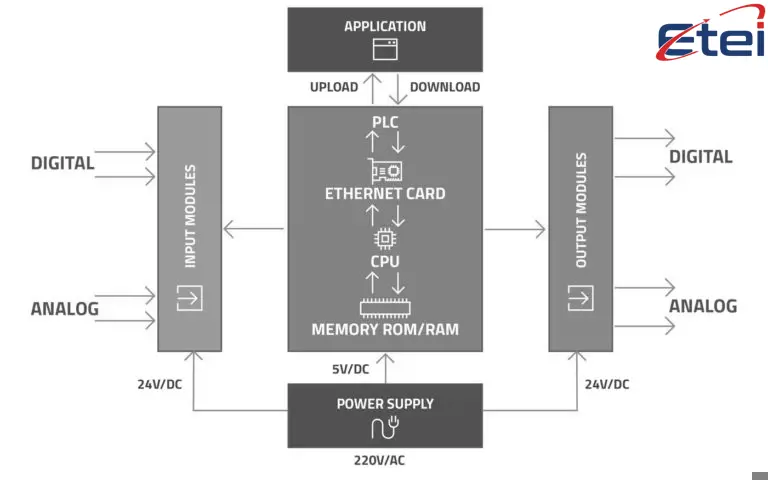
The Loop: Your Logic On Repeat
A PLC is not meant to execute your program just once.
Instead, it runs your code again and again endlessly, in what is called the scan cycle.
That cycle is divided into four major steps:
1. Input Scan
Now that the PLC has all the input devices to check: sensors, switches, buttons, and the like.
The states, ON/OFF, 1 or 0, are saved in memory.
Examples:
● Button A is pressed → saved as 1
● Sensor B is inactive → saved as 0
These values are used in the following step.
2. Program Execution
This is where the PLC executes your logic.
Now it goes rung by rung in ladder logic, evaluating each instruction against the inputs it just scanned.
Examples:
● IF Button A = ON → Turn on Motor Relay
● IF Sensor B = OFF AND Temp Sensor > 50°C → Turn on Alarm
This is the "thinking" part where decisions are made.
3. Output Update
Once the logic has finished, the PLC begins issuing commands to the output devices.
Such output devices might be:
● Motors
● Solenoids
● Lights
● Buzzers
● Relays
It waits until the logic has finished to send outputs at once, rather than sending them as it goes along.
That is to avoid strange glitches caused through the input switch midway during the scan.
4. Housekeeping
During this phase, the PLC carries out background activities:
● Communication with HMIs or SCADA
● Self-checking
● Diagnostics
● Timekeeping
● Error-logging.
Afterward, the process goes back to the very beginning.
This whole sequence repeats hundreds or thousands of times per second.
Example In Action: Bottle Filling Machine
Let's say you're controlling a bottle filling station.
Here is one scan by the PLC:
● Input: The sensor detects a bottle.
● Logic: IF Bottle Detected THEN Open Fill Valve.
● Output: The bottle is filled.
● Next scan: Closes valve when the level sensor is full.
It reacts within milliseconds to help keep your line fast and smooth.
PLC Scan Cycle Table
| Step | What Happens | Devices Involved |
|---|---|---|
| Input Scan | Reads sensor/switch status | Push buttons, proximity sensors |
| Program Execution | Runs user-defined logic | CPU, internal memory |
| Output Update | Sets output devices based on logic | Relays, motors, alarms |
| Housekeeping | Handles comms, errors, and system checks | HMI, SCADA, clock, memory |
Important: Scan-Time: A Key Factor
The duration it takes to carry out one full scan is referred to as the scan time.
Short scan times mean fast responses.
Whenever your scan is long, you could miss fast signals of quick interruptions like button presses.
Pro tip: Keep code lean and I/O as simple as possible in the event that you need a fast response.
PLC Programming Basics
You have the hardware. But how does it work when someone wishes to tell a PLC what it should do?
This is where programming comes in.
If you've already done that "if-this-then-that" instruction, then you're halfway down the road.
Let's have a look at the very basics of programming logic in the PLC so that you can write your own.
What Is PLC Programming?
PLC programming is logic written to tell the PLC:
● When to turn something on;
● When to turn something off;
Or another thing, to act appropriately under a given set of situations...
Basically, it is like drawing a flowchart for the machine.
You will do this through special software provided by the PLC manufacturer.
Some examples of this software:
● Siemens TIA Portal
● Allen-Bradley RSLogix / Studio 5000
● Mitsubishi GX Works
● Omron CX-One
Common Languages for PLC Programming

PLCs permit the use of many languages, each for a divergent application.
Here are a few common ones:
| Language | Description | Best For |
|---|---|---|
| Ladder Logic (LD) | Graphical, relay-style diagrams | Electricians, control engineers |
| Function Block (FBD) | Logic blocks connected by wires | Process industries |
| Structured Text (ST) | Code-style (like Pascal or C) | Complex math or algorithms |
| Instruction List (IL) | Assembly-style text commands (rare today) | Legacy systems |
| Sequential Function Chart (SFC) | Flowchart of logic steps | Step-by-step operations |
Basic PLC Logic Concepts
Let’s break down the fundamental building blocks of which there are almost always types of elements in every PLC program.
Contacts (—[ ]—)
These are your condition inputs.
They could be sensor outputs, switches, or anything that sends a signal for the PLC to read.
Normally Open (NO): True when ON
Normally Closed (NC): True when OFF
Coils (—( )—)
These are your outputs-the ones controlled by the PLC.
Example:
If [Start Button] is pressed, turn ON (Motor Relay).
Timers and Counters
Used to delay actions or count occurrences.
TON: Timer On Delay (begins counting after condition is true)
CTU: Count Up (count is incremented every time it is triggered)
Example: Simple Motor Start Logic
Objective: Motor start upon pressing start button, and its stop with stop button.
Logic:
Start = ON and Stop = OFF → Energize Motor
In English:
If start is pressed AND stop is not pressed, turn on the motor.
What You Need To Start Programming
● A laptop or PC
● PLC programming software
● A programming cable (usually USB or Ethernet)
● Access to a PLC or simulator to test
Most vendors also provide an offline simulator, so you can test your logic before dealing with actual hardware.
Quick PLC Programming Tips
Use clear naming (e.g., “Pump1_Start” not “X1”)
Keep logic modular, by task
Comment your rungs, future you will say thank you
Use timers, not delays, for precise control
Always run a simulation test before hitting the road
Understanding PLC Ladder Logic

If a PLC had a native language, ladder logic would be it.
It is one of the most common types of PLC programming, the most visual, and pretty much the easiest type to program a PLC.
If you have not really written a line of code for a device before, ladder diagrams are something that can be picked up quickly.
Have a look at some basics of ladder logic with some simple examples worthy of your attention.
What Is Ladder Logic?
Ladder logic is a graphical programming language used to draw like a ladder.
● Vertical rails on each side (representing power flow)
● Horizontal rungs in between (each rung is a logic operation)
Think of it like wiring up relays on a schematic—but on your screen.
If the rung conditions are met, the “current” flows left to right, and the output is triggered.
Key Ladder Logic Elements
Here are the main symbols and blocks you’ll use in a ladder diagram:
| Symbol | Function | Looks Like | Description |
|---|---|---|---|
| NO Contact | Normally Open Input | —[ ]— | True when input is ON |
| NC Contact | Normally Closed Input | —[/]— | True when input is OFF |
| Coil | Output | —( )— | Turns an output ON when rung is true |
| Timer | TON, TOF | [TON] | Adds delay before/after output activates |
| Counter | CTU, CTD | [CTU] | Counts events (up/down) |
Example: Start/Stop Motor Control We want to press a button to start a motor, and another to stop it.
The ladder diagram would look like this:
[Start]----[/Stop]----(Motor)
What happens here?
Motor ON when Start is pressed
Motor OFF when Stop is pressed
This is one of the most common rung types.
Add Seal in (Holding) Circuit A seal in circuit maintains the output being on after one releases the push button.
Why?
Because push buttons are momentary.
Without a seal, the moment you release Start, your motor turns off.
Add a feedback contact from the Motor itself:
[Start]----[/Stop]----+----(Motor)
|
[Motor]
From now onward, this rung stays TRUE even if Start is released.
Press Stop to break the circuit and turn the motor off.
Timer Example: Delay Fan Shutdown Want to delay fan shutdown by 5 seconds?
Use a TON (Timer On Delay):
[Stop]----[TON 5s]----(Fan)
Logic:
Timer starts when Stop is pressed.
Fan switches off after 5 seconds.
Good for post-run cooling or exhaust.
PLC Applications In Industry
Imagine: Barges descending from Mombasa and barges ascending toward hinterlands.
Whether it is for shutting down a motor or running a plant, PLCs make it possible.
Let’s take very common PLC-type scenarios functioning in the industry, giving you an actual picture you can relate to.
Manufacturing and Assembly Lines
This is where the history of PLCs began.
Factories have to work fast, safe, and without failures. PLCs ensure all this.
Typical tasks:
● Control of conveyors
● Operation of robotic arms
● Product or cycle counting
● Jamming detection within products/processes
● Coordinating among different stations
An example scenario:
● In a car assembly plant, robotic welding arms are controlled by the PLC.
● It ensures that welding is performed whereby and whenever it ought to.
● If anything goes wrong, the process is stopped, and an alarm is raised.
Building Automation Systems
Giant office buildings, shopping malls, and skyscrapers have their systems run via PLC.
They control actuation for:
● HVAC
● Elevators
● Fire suppression systems
● Automatic doors
● Lights on occupancy and daylight
An example scenario:
In the high-rise building, the PLC supervises the smoke detectors.
On detecting smoke, it immediately isolates HVAC to contain the fire and activates alarms and sprinkler systems.
All within milliseconds.
Water And Wastewater Plants
Clean water needs to be automated!
PLCs help manage water flow rates, chlorine injection, pump operation, tank level, and fault detection in valves and filters.
An example:
The PLC receives a level signal when the water tank is full.
It then commands the pump to shut down and logs this event.
Simultaneously, it alerts the operator via HMI or SCADA.
Power and Energy Management
Power and energy management include:
● Power distribution panels
● Diesel generators
● Automatic transfer switches
● Solar and wind power-based renewable energy systems
● Load shedding at peak demand
Example:
In the event of an outage, the PLC brings up the backup generator and transfers the load.
Once power returns, it switches back everything without needing any manual intervention.
Agriculture and Food Processing
Farming is now high-tech.
PLCs control irrigation schedules, greenhouse temperatures, grain dryers, packaging and bottling machines, and pasteurization systems.
Applications Table
| Industry | What PLC Controls | Benefit |
|---|---|---|
| Manufacturing | Robots, conveyors, sensors | Speed + consistent output |
| Building Automation | HVAC, elevators, alarms | Energy savings + safety |
| Water Treatment | Pumps, valves, chemical dosing | Precision + contamination control |
| Power Plants | Switchgear, ATS, load monitoring | Failover + uptime |
| Agriculture | Sprinklers, fans, feeders | Crop yield + reduced manual labor |
PLC vs DCS (Distributed Control System)
If you have been reading about automation, you must have heard about DCS.
How does a DCS compare to a PLC-wise?
Both control systems automate processes; hence they are not interchangeable.
Let's demystify what PLCs and DCSs are, so you would know which one suits your application.
Quick Definitions
PLC (Programmable Logic Controller):
It's a relatively fast, very rugged industrial computer used for discrete processes-control of anything; turning on/off, counting, or timing.
DCS (Distributed Control System):
It is a control system clustered to handle a network of continuous processes-temperatures, flows, and chemical reactions.
Both are smart, it is just that they are two very different types of automation.
Basic Structural Differences
Architecture
PLC:
Centralization of logic systems, either modular or compact.
One PLC could be all controlled within a machine.
DCS:
Inherently distributed.
Each section of the system has its processor (controller), all connected by a common control network.
Scalability
Deploying PLCs for smaller systems and stand-alone machines is quite straightforward.
DCS is more scalable, for plant-wide process control.
Control Focus
PLCs handle fast, discrete actions: sensors, motors, actuators, alarms.
DCS manages slow, continuous processes: temperature, pressure, flow.
Example:
PLC: Control over the packaging machine that seals and labels bottles.
DCS: Control over a refinery wherein pressure and temperature are monitored on a 24/7 basis.
Programming Difference
PLC programming is done using-Ladder Logic or Function Block Diagrams.
DCS programming is more process control languages with advanced tuning of PID, trending, and even integration with historians.
Communication & Integration
DCS are networked systems with built-in SCADA, data logging, and alarm management.
In PLCs, you must add these features via external software or HMIs.
Comparison Table: PLC vs DCS
| Feature | PLC | DCS |
|---|---|---|
| Best For | Discrete control (on/off) | Continuous process control |
| Structure | Centralized or modular | Fully distributed |
| Speed | Fast response (ms) | Slower, steady control |
| Scalability | Ideal for small to medium systems | Built for full plant control |
| Programming | Ladder, FBD | Process-specific languages |
| Cost | Lower upfront cost | Higher cost, but integrated features |
| Integration | Add-on SCADA, HMI | Built-in DCS suite |
Can a PLC and a DCS Work in Tandem?
Of course.
● While PLCs operate on machinery like motors and conveyors,
● DCS performs high-level process control such as flow, temperature, and pressure.
● The systems are often linked by industrial networks like Ethernet/IP or Modbus TCP.
Advantages, Disadvantages, and Troubleshooting of PLCs
Why are PLCs almost everywhere in industrial automation?
They are fast, sturdy, and programmable. However, being so perfect!
Advantages and disadvantages of PLCs and what happens when something goes wrong.
Key Advantages Locked In PLCs
1. Reliable Under Harsh Environments
PLCs are designed to withstand:
● Vibration
● High/low temperatures
● Dust and humidity
● Electrical supply fluctuations
You can simply install it in a dirty factory, and it would keep on running for years.
2. Easy To Program and Update
No need for a software engineering degree just to understand ladder logic.
PLCs are made for control technicians and electricians.
Does the logic need some changes? No need to do any rewiring; just upload a new program.
3. Modular And Scalable
Especially with modular PLCs:
● You can add new I/O (input/output) cards
● Upgrade your CPU
● Replace damaged modules without returning to the workshop
Hence, this should be regarded as a long-term investment.
4. Real-Time Performance
Inputs are scanned by the PLC and the outputs are controlled in a matter of milliseconds, immediately responding to:
● Packaging
● Assembly
● Safety alarms
5. Linking To Other Systems
A PLC can be connected to:
● HMIs (Human-Machine Interfaces)
● SCADA systems
● Remote I/O devices
Industrial networks such as Modbus or Ethernet/IP
Disadvantages Of PLCs
PLCs are not good at everything.
1. Limited For Complex Data Handling
They're poor for:
● Image processing
● Database handling
● Advanced analytics
Leave that for PCs or DCS.
2. Programming Software Is Brand-Specific
You program a Siemens PLC with Siemens software.
Same goes for Allen-Bradley, Omron, Mitsubishi, etc.
User software is not available across brands.
3. Not Economical For Simple Applications
For very simple tasks, like turning on a light, maybe you don't even need a PLC.
Relays or microcontrollers will do fine and cheaper.
PLC Troubleshooting Tips
Trouble with that strange feeling of "something-is-not-working"? Don't panic.
Try the following:
● Check the power: Is the PLC powered? Are the status LEDs flashing?
● Review the inputs: Using the programming software, check if the inputs are detected.
● Look at the outputs: Are the outputs activated in the software while not being activated in hardware?
● Check the wiring: Loose terminals and broken wires are quite rampant.
● Use the online mode: Monitor the program real-time while tracing the logic.
Quick Summary Table
| Area | Advantage | Disadvantage |
|---|---|---|
| Performance | Fast, real-time logic execution | Not ideal for data-heavy tasks |
| Reliability | Durable in extreme environments | Requires brand-specific parts/software |
| Flexibility | Easy to reprogram and scale | Limited in advanced computing functions |
| Troubleshooting | Software tools available for diagnostics | Needs basic training to debug effectively |
Frequently Asked Questions (FAQs)
What Is a PLC for Dummies?
A PLC is a digital computer designed for the highest level of insulation to automate processes on machines through a given program.
Can I Learn PLC Programming by Myself?
Absolutely, and most probably. Many online tutorials and simulators exist, along with free software tools to start your learning process from scratch.
What Major Industries Use PLCs?
Manufacturing, energy, water treatment, food processing, and building inside are some of the bigger industries that mostly work on PLCs.
What is the Difference Between Ladder Logic and Structured Text?
Ladder logic is graphical and easy to use by electricians. Structured Text is text-based and better for more complex calculations.
How Do I Troubleshoot a Problem in a PLC?
Try and work your way through power, I/Os, wiring, and then program status with the diagnostic tools provided for the software.
Article précédentThe Complete Guide To Screwdrivers: Types, Sizes, Uses, And Best Sets
Article suivantPower Conditioner: What It Is, How It Works, and Why You Need One
Similaire
Flip-flops are digital circuits that sto..

Sensors detect changes in the environmen..

Oscillators are circuits that generate r..

Thermopiles are sensors that convert hea..

CR123 and CR123A batteries are the same ..

The L1154F is an alkaline button cell, s..
POPULAIRE

Telephone cables (RJ11) connect landline..

AG10 battery equivalents include 189, LR..

Battery testers check battery health by ..

Switch poles control how many circuits a..

Learn how to strip a wire safely and eff..